on Leave a Comment

Difference Between C and C++

This article contains Difference Between C and C++.

We discuss about difference between C and C++ according to their features.

Keywords

C has 32 keywords. But C++ has some new keywords such as new and delete.

Length of Identifiers

C has restriction for the length of identifier. ANSI C recognizes only first 32 character of identifier. ANSI C++ has no limits for length.

Declaration of global variable

In C, a global variable can be declared several times without using extern keyword. But C++ does not permit this.

Character Constants

In C, character constants are of type int. But C++ treats character constants as char because compiler has to distinguish between two overloaded functions.

Example:

void f1(int);
void f2(char);

Programming Paradigm

C supports procedure programming paradigm. C++ supports object oriented, procedure and generic programming paradigm.

Function Prototype

It is necessary to provide function prototype in C++ but it is not necessary in ANSI C.

Reference variable

C++ supports reference variable. But C does not support reference variable.

Overloading

C++ supports function and operator overloading but C does not support overloading concept.

Input/Output

C uses functions for input / output, for example printf and scanf. C++ uses objects for input / output, for example cin and cout.

OOP Concepts

C does not support OOP concepts like encapsulation, polymorphism, inheritance etc. C++ is object oriented programming language, hence it supports OOP concepts.


on Leave a Comment

Storage Classes in C++

This article contains Storage Classes in C++.

As a variable has its data type, same a variable has its storage class. Storage class of a variable defines its scope and lifetime of a variable. If we do not mention the storage class of a variable, then C++ compiler automatically set the variable to its default storage class depending on the context of that variable.  

Value of a variable may stored in memory and CPU registers. Storage class of a variable defines where the value of variable will store.

Storage Class of a Variable defines the following things:

(1) Where the variable will store.
(2) Initial value of a variable.
(3) Life of a variable.
(4) Scope of a variable.

Storage Classes in C++

(1) Automatic
(2) Register
(3) Static
(4) External
(5) Mutable

Automatic Storage Class

auto keyword is used for automatic storage class. Default initial value of automatic variable is garbage value. Value of automatic storage class variable is stored in memory. Scope of automatic variable is local to the block in which it is defined. Lifetime of automatic variable is till the control remains in the block in which it is defined.

Program of Automatic Storage Class

#include<iostream>
using namespace std;
int main()
{
    auto int a=1;
    {
        auto int a=2;
        {
            auto int a=3;
            cout<<a;
        }
        cout<<endl<<a;
    }
    cout<<endl<<a;
    return 0;
}

OUTPUT:

3
2
1


Register Storage Class

register keyword is used for register storage class. Storage of register variable is in the CPU registers. Default initial value of register variable is garbage value. Scope of register variable is local to the block in which it is defined. Lifetime of register variable is till the control remains in the block in which it is defined.

Register variable is accessed faster because their value is stored in CPU register. Accessing time of a value stored in CPU registers is always less as compared to memory.

Program of Register Storage Class

#include<iostream>
using namespace std;
int main()
{
    register int i;
    for(i=1;i<=10;i++)
    {
        cout<<endl<<i;
    }
    return 0;
}

OUTPUT:

1
2
3
4
5
6
7
8
9
10

While declaring a variable to register storage class, it is not sure that variable will store in CPU register. Because the CPU has limited registers.


Static Storage Class

static keyword is used for static storage class. Storage of static variable is in memory. Default initial value of static variable is zero. Scope of static variable is local to the block in which it is defined. Value of static variable persists between different function calls.

Visibility of a static variable is in the function where it is defined. Life of static variable is till the program terminates. If we define a static variable inside a function, and when we call that function and change the value of static variable, and when the second time we call that function, the value static variable remains unchanged.

Program of Static Storage Class

#include<iostream>
using namespace std;
void fun(int a);
int main()
{
    fun(1);
    fun(2);
    return 0;
}
void fun(int a)
{
    static int s;
    s=s+a;
    cout<<endl<<s;
}

OUTPUT:

1
3


External Storage Class

External storage class variable stores inside the memory. Default initial value of external variable is zero. External variable is declared outside all function and it is accessible to all functions. Its scope is global. Lifetime of external variable is till the program terminates. 

Program of External Storage Class

#include<iostream>
using namespace std;
int a;
void fun(int i);
int main()
{
    fun(1);
    fun(2);
    return 0;
}
void fun(int i)
{
    a=a+i;
    cout<<endl<<a;
}

OUTPUT:

1
3


Mutable Storage Class

mutable keyword is used for mutable storage class. A class object or member function can be declared as const making their data not modifiable. But when we want to create const object and we want to modify a particular data only. In this situation we can make that data mutable.
Example: mutable int x;


on Leave a Comment

C++ If, If-Else and Nested If-Else Statement

This article contains C++ If, If...Else and Nested If...Else Statement.

C++ If Statement

In C++, if statement can be implemented in two ways:

(1) Simple if statement 
(2) if...else statement

Simple if statement 

Syntax:

if(expression is true)
{
        //statements
}

Example:

int x=1;
if(x==1)
{
        cout<<"x equals 1";
}

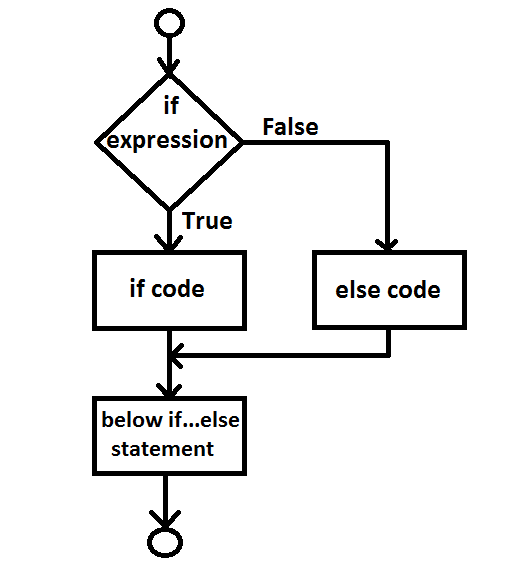
Flow Chart

c++ if statement
Flow Chart of If Statement
Compiler checks if expression, if expression is true then compiler executes if code, otherwise compiler executes other statements below if body.

Program of C++ If Statement

/*C++ program to check even number using if statement*/
#include<iostream>
using namespace std;
int main()
{
    int n;
    cout<<"Enter a number : ";
    cin>>n;
    if(n%2==0)
    {
        cout<<n<<" is even number";
    }
    return 0;
}

OUTPUT:

Enter a number : 56
56 is even number


if...else statement

Syntax:

if(Test Expression)
{
       //Statements
}
else
{
       //Statements
}

Example:

int x=0;
if(x==1)
{
      cout<<"x equals 1";
}
else
{
      cout<<"x equals 0";
}
Flow Chart

c++ if else statement
Flow Chart of C++ If Else Statement

Compiler checks if expression, if true, then compiler executes if code, otherwise compiler executes else code.

Program of C++ If Else Statement

/*C++ program to whether a number is even or odd using if-else statement*/
#include<iostream>
using namespace std;
int main()
{
    int n;
    cout<<"Enter a number : ";
    cin>>n;
    if(n%2==0)
    {
        cout<<n<<" is even number";
    }
    else
    {
        cout<<n<<" is odd number";
    }
    return 0;
}

OUTPUT:

Enter a number : 27
27 is odd number


Nested if...else

If...else statement is useful to check two different possibilities. But if there is need to check more than two conditions, then nested if...else comes in use. 

Nested if...else statement is used to check more than two conditions.

Syntax:

if (testExpression1) 
{
   // statements
}
else if(testExpression2) 
{
   // statements
}
else if (testExpression 3) 
{
   // statements
}
.
.
else 
{
   // statements
}

Examples:

int x=0;
if(x<0)
{
    cout<<"x is less than 0";
}
else if(x==0)
{
    cout<<"x equals zero";
}
else
{
    cout<<"x is greater than 0";
}

Program of C++ Nested If Else

/*C++ program to check whether a number is less than 0, equal to 0, between 1 and 100 and greater than 100 using nested if else statement*/
#include<iostream>
using namespace std;
int main()
{
    int n;
    cout<<"Enter a number : ";
    cin>>n;
    if(n<0)
    {
        cout<<n<<" is less than 0";
    }
    else if(n==0)
    {
        cout<<n<<" is equal to 0";
    }
    else if(n>0 && n<=100)
    {
        cout<<n<<" values lies between 1 and 100";
    }
    else
    {
        cout<<n<<" is greater than 100";
    }
    return 0;
}

OUTPUT:

Enter a number : 101
101 is greater than 100

on Leave a Comment

C++ Program to Print Prime Numbers in a Given Range

This article contains C++ Program to Print Prime Numbers in a Given Range.

To understand this you need to understand these concepts :


Assume that user has entered a range of 10 to 20. Then prime numbers between 10 and 20 is 11, 13, 17, 19. You need to print these prime numbers using c++ programming code. 

C++ Program to Display Prime Numbers in a Given Range

#include<iostream>
using namespace std;
int main()
{
    int first,second,i,flag;
    cout<<"Enter first number : ";
    cin>>first;
    cout<<endl<<"Enter second number : ";
    cin>>second;
    if(first>second)
    {
        int t;
        t=first;
        first=second;
        second=t;
    }
    cout<<endl<<"Prime numbers between "<<first<<" and "<<second<<" : ";
    for(;first<=second;first++)
    {
        flag=0;
        for(i=2;i<first/2;i++)
        {
            if(first%i==0)
            {
                flag=1;
                break;
            }
        }
        if(flag==0)
        {
            cout<<first<<"\t";
        }
    }
    return 0;
}

OUTPUT 1:

Enter first number : 20

Enter second number : 30

Prime numbers between 20 and 30 : 23    29


OUTPUT 2:

Enter first number : 35

Enter second number : 45

Prime numbers between 35 and 45 : 37    41      43


OUTPUT 3:

Enter first number : 100

Enter second number : 85

Prime numbers between 85 and 100 : 89   97